Six Hundred Ways Screensaver
The Six Hundred Ways screensaver shows what one US dollar buys in national currencies, drawn from the six hundred-odd rates Coinbase publishes against the dollar. It runs in the browser with nothing to install; press ESC to exit.
Live preview
Press ESC to leave fullscreen. Settings are saved in your browser only.
How the Six Hundred Ways screensaver works
The saver reads Coinbase's public exchange-rates endpoint, key-free.
No account and no key: the request goes straight from your browser, or from this site's own refreshed copy of the feed where the source does not permit browser access.
Values are drawn on a canvas that resizes with the window, so it works on a laptop or a wall display.
If the source is unreachable the saver says so on screen rather than showing stale numbers as though they were current.
How an exchange-rate table is built
Coinbase, a US-based cryptocurrency exchange, offers a public endpoint, /v2/exchange-rates, that needs no authentication. It returns a map of currency codes to rate values, each the value of one unit of the base currency, and the base defaults to USD unless a currency parameter says otherwise. Values arrive as strings, such as an entry for a three-letter code like AED.
A table like this is a reference for converting between currencies in apps and price displays, not a quote at which anyone can deal. Actual markets add a spread between buying and selling, and banks, card networks and payment apps apply their own margins and fees, so what you receive in practice is rarely the number on the table.
A rate expressed per unit of the base currency can look strange for currencies with large nominal numbers: one dollar may buy thousands of units of a currency that has seen high inflation, which says nothing about its strength relative to another country’s economy. Rates also move continuously, so a number shown is true only for the moment the data was fetched, and the ordering of the list can change from one refresh to the next.
A worked example
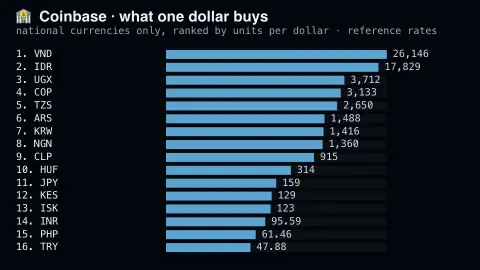
Sixteen currencies ranked by units per dollar, bars scaled logarithmically because the range spans several orders of magnitude. The full feed mixes national currencies with hundreds of crypto assets; this filters to national currencies, because a combined ranking would really just be a list of which token is cheapest.
Settings & tips
- Accent and Background recolour the display without changing the data.
- Add it to a Multi-view grid to watch it alongside other live savers.
- Press ESC at any time to leave fullscreen.
Frequently asked questions
- Why filter out the crypto assets?
- Because including them makes the ranking meaningless. Tokens priced in tiny fractions of a cent would occupy every position, and the question the chart asks — what is a dollar worth around the world — would go unanswered.
- Can I trade at these rates?
- No. They are indicative reference rates. Any actual conversion carries a spread and fees, and the rate you are quoted will differ.
- Is this real data?
- Yes. It comes from Coinbase's public exchange-rates endpoint, key-free. Nothing is invented or simulated, and if the source cannot be reached the saver reports that instead of drawing something plausible.
- Does it cost anything or need an account?
- No. Every screensaver here is free, runs in the browser and needs no sign-up. This one uses a public API that requires no key.
- Why do some currencies have enormous numbers?
- The figure is the amount of that currency equal to one unit of the base. Currencies with a small nominal value, often after inflation or redenomination, need many units to match one dollar.
- Is this the same rate my bank would give me?
- Usually not. Banks and payment services add margins and fees to a market reference rate.
- How fresh are the numbers?
- They reflect the moment the data was last fetched, so they can be minutes behind. Exchange rates change throughout the trading day.