Upcoming Events Screensaver
The Upcoming Events screensaver shows an agenda of what's coming up on a published public calendar, gathered by the background pipeline. It's free, runs in your browser, and ESC exits.
Live preview
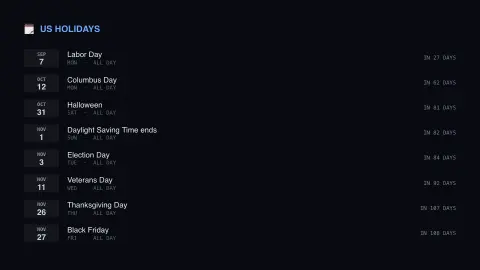
Press ESC to leave fullscreen. Settings are saved in your browser only.
How the Upcoming Events screensaver works
The background pipeline downloads a published public iCal calendar and parses out its upcoming events.
Events are listed as an agenda with a date chip, the day of the week and how far away each one is.
Anything already past is dropped, and repeated entries on the same day are removed.
The calendar is configured by the site pipeline — it is never your personal calendar.
How a public iCal feed becomes an agenda
iCalendar, defined in RFC 5545 and often called iCal or ICS after its usual file extension, is a plain-text standard for calendar data that most calendar apps can import and export. A published calendar is simply a URL that returns such a file listing events, each with properties like a title and start and end values, and sometimes a recurrence rule. Many organisations, communities and governments publish such feeds so that anyone can subscribe.
Two details of the format shape what you see. A start value can be a plain DATE with no time of day, which is how an all-day event such as a holiday appears as a date with no clock time. Recurring events can be stored as a single entry with a rule (RRULE) that has a required frequency such as yearly or weekly, and software must expand the rule into individual dates.
The feed is a snapshot that its owner maintains by hand or by automation, so it is only as current as their updates. Date-times can be written as floating local time, in UTC, or with a time zone reference, so a time can land on a different day for viewers elsewhere. The agenda is a convenient look-ahead, but it is not a substitute for checking the official source before planning around a date.
A worked example
The agenda lists Labor Day 43 days out, then Columbus Day, Halloween and Thanksgiving beneath it, each with its weekday and a countdown, so you can see the shape of the months ahead at a glance.
Settings & tips
- The calendar shown is configured by the site's pipeline, not chosen in your browser.
- Events already past are automatically dropped.
- Run
automation/run.py publiccalendarto refresh the agenda.
Frequently asked questions
- Does this read my calendar?
- No. It reads a published public calendar configured by the site's pipeline. Nothing personal is accessed, and nothing is stored in your browser.
- What calendar is shown?
- By default a public holidays calendar, but the pipeline can point at any published iCal feed — launch schedules, sports fixtures, academic terms.
- Are repeating events supported?
- Only their first occurrence. The parser deliberately doesn't expand recurrence rules, which suits published date calendars rather than personal ones.
- Is a key needed?
- No — public iCal feeds are read key-less.
- Is it free?
- Yes — free, no download, in your browser.
- What is the difference between iCal, ICS and a calendar subscription?
- iCalendar is the standard (RFC 5545) and .ics is the usual file extension, with iCal as a common nickname. A subscription is a calendar app that re-reads the same address from time to time so new events appear.
- Why do some events have no time?
- The format lets an event's start be a date alone, with no time of day. This is how all-day events such as holidays are typically stored.
- Can a public calendar list events that are not public holidays?
- Yes. Publishers can mix official holidays with observances, awareness days and cultural dates, so an entry appearing does not necessarily mean offices or schools close.