Twitch Chat Firehose Screensaver
The Twitch Chat Firehose screensaver streams the live chat of any Twitch channel you name, connected key-less and anonymously. It's free, runs in your browser, and ESC exits.
Live preview
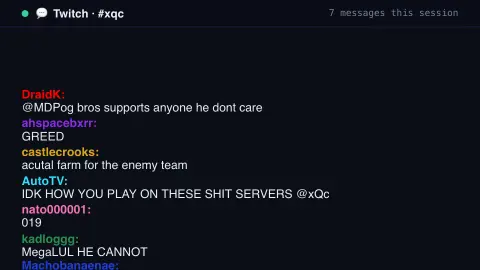
Press ESC to leave fullscreen. Settings are saved in your browser only.
How the Twitch Chat Firehose screensaver works
The saver opens a live, anonymous connection to Twitch's own public chat server over WebSocket — no key, login or account.
Enter any channel name and its live chat messages flow up the screen with the chatter's name in their chosen colour.
A built-in content filter drops messages that match a word blocklist, and you can narrow it to a keyword.
If the connection drops it reconnects automatically, so the feed keeps flowing.
Twitch chat and the IRC heritage
Twitch is a live-streaming platform where viewers talk to each other and to the streamer in a text chat beside the video. Its chat system is built on IRC, Internet Relay Chat, a text-messaging protocol dating to 1988. Twitch uses a modified form of the IRC protocol plus IRCv3 message tags, which attach metadata such as a user’s display name, name colour and badges to each message.
Each channel has its own room, and for a large stream the messages can arrive faster than a person can read. Chat has its own culture: emotes, which are small images that stand in for words, repeated spam phrases and in-jokes particular to a community. Because the display here is text, many emotes show up as the plain word that triggers them. Channels can also restrict chat with modes such as slow mode, followers-only, subscribers-only or emote-only.
Live chat is unreviewed text written by strangers, so quality and tone vary enormously from channel to channel. A word filter reduces but cannot eliminate offensive content, and a channel’s chat is a conversation shaped by what is on the stream at that moment, so without the video it can be hard to follow. Offline channels or those with restricted chat may appear quiet.
A worked example
Messages rise from the bottom exactly as chatters send them — reactions, emotes spelled out, jokes, copypasta — a real-time window onto one channel's live chat room. Type a channel name to switch which stream's chat you're watching.
Settings & tips
- Channel name switches to any Twitch channel's live chat, live or offline.
- Filter by word shows only messages containing your word (leave blank for everything).
- Accent recolours the header and highlights.
Frequently asked questions
- Are these real live chat messages?
- Yes. They stream from Twitch's own public chat server the moment they're sent, so it's genuinely real-time.
- Do I need a Twitch account?
- No. The saver connects anonymously — no login, key or account needed.
- Can I watch any channel?
- Yes. Enter any Twitch channel name; if the channel is quiet or offline, the saver waits for its next message.
- Is the content filtered?
- Yes, on a best-effort basis. A built-in blocklist drops messages with slurs or explicit terms, but live public chat can still be unpredictable.
- Is it free?
- Yes — free, no download, in your browser.
- What is an emote?
- It is a small image or animated icon that viewers type as a code word to express a reaction. In this text display, many show up as the plain word that triggers them.
- Why can chat seem cryptic without the stream?
- Messages react to what's happening on screen, so many comments refer to events, jokes or games you can't see.
- Why is there nothing from some channels?
- If a channel is offline, its chat may be silent, and chat modes such as follower-only, subscriber-only or slow mode limit who can post and how often.