Recipe Showcase Screensaver
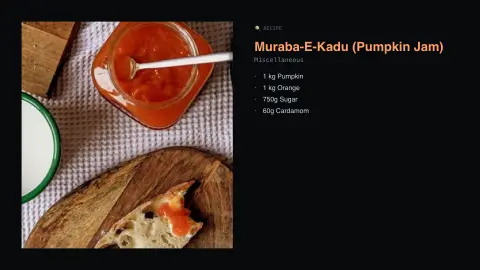
The Recipe Showcase screensaver shows real recipes from the key-less TheMealDB API: the dish photo, its cuisine and category, and the full ingredient list with measures, rotating one dish at a time. It's free, runs in your browser, and ESC exits.
Live preview
Press ESC to leave fullscreen. Settings are saved in your browser only.
How the Recipe Showcase screensaver works
The saver reads TheMealDB directly in your browser — no key and no account.
Real recipes from the key-less TheMealDB API: the dish photo, its cuisine and category, and the full ingredient list with measures, rotating one dish at a time..
It refreshes on a schedule, so what you see stays current.
Colours and the accent can be changed in settings; nothing is stored beyond your own browser.
About TheMealDB
TheMealDB describes itself as a free data source API for recipes, launched in 2016 to encourage developers to build apps and projects with its data. By its own account the project began on the Kodi forums, as a way to browse recipes on a TV. A sibling project, TheCocktailDB, covers drinks in the same way.
Each entry pairs a dish with a category such as seafood or dessert, an area standing for a national or regional cuisine, a photograph, instructions, and a list of ingredients with matching measures. The cuisine and category labels are a convenient index, not a rigorous classification, so a recipe tagged Italian or Japanese may be one familiar version of a dish rather than a canonical regional one. Measures are written as free text, and units vary between recipes.
Treat the showcase as inspiration rather than tested instruction. Quantities, oven temperatures and timings are not checked the way a cookbook publisher would check them, and allergens or dietary suitability are not guaranteed.
A worked example
Real recipes from the key-less TheMealDB API: the dish photo, its cuisine and category, and the full ingredient list with measures, rotating one dish at a time.
Settings & tips
- Accent and Background recolour the display.
- Data comes straight from TheMealDB in your browser.
- Press ESC to leave fullscreen.
Frequently asked questions
- Is this real data?
- Yes — it comes from TheMealDB and is refreshed on a schedule.
- Is a key needed?
- No. This source is fully key-less.
- Does it need an internet connection?
- Yes — it reads a live source, so it needs a connection to update.
- Is it free?
- Yes — free, no download, in your browser.
- Are the measurements reliable?
- They are written as free text and vary in units, and they are not guaranteed to be kitchen-tested, so use them as a guide.
- What does the cuisine label refer to?
- TheMealDB assigns each dish an area, such as Italian or Mexican, which is a loose tag for the cooking tradition the dish is filed under.
- Does it tell me about allergens?
- No. The ingredient lists are what the database holds, and dietary or allergen information is not provided.