Europe’s Data, Catalogued Screensaver
The Europe’s Data, Catalogued screensaver shows datasets on the EU open data portal, key-less. Every text field is a language map rather than a string, because the portal is genuinely multilingual rather than English with translations bolted on — so English is preferred and the first available language used as a fallback, which keeps rows from catalogues that never published an English description. It's free, runs in your browser, and ESC exits.
Live preview
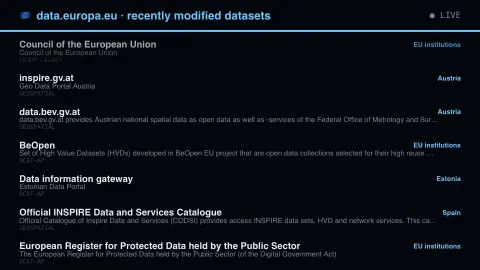
Press ESC to leave fullscreen. Settings are saved in your browser only.
How the Europe’s Data, Catalogued screensaver works
The saver reads the source described above and draws it on a canvas — no account, no tracking.
Datasets on the EU open data portal, key-less. Every text field is a language map rather than a string, because the portal is genuinely multilingual rather than English with translations bolted on — so English is preferred and the first available language used as a fallback, which keeps rows from catalogues that never published an English description.
It refreshes on a schedule, so what you see stays current.
Colours can be changed in settings; nothing is stored beyond your own browser.
What the EU open data portal is
data.europa.eu is the official portal for European data, run by the EU Publications Office. It holds datasets from EU institutions and bodies and also harvests metadata from national, regional and domain-specific data portals across Europe, so a listing may be published by a much smaller body than the EU itself. Harvested records are standardised using DCAT-AP, an application profile of DCAT, the W3C vocabulary for data catalogues. It gives titles, descriptions, publishers, formats and links a common shape, so entries from many catalogues can be searched together.
Multilingualism is the distinctive feature. The EU works in many official languages, so descriptive fields are stored as maps from a language code to text rather than a single string, and a dataset may have a title in some languages but not others. A page cannot assume English is present; it has to choose a language and fall back to another when one is missing.
An entry describes a dataset and does not contain it. Titles come from the publishing body and vary in style and detail, and a dataset's listing date is not the same as the period its figures cover.
A worked example
Datasets on the EU open data portal, key-less. Every text field is a language map rather than a string, because the portal is genuinely multilingual rather than English with translations bolted on — so English is preferred and the first available language used as a fallback, which keeps rows from catalogues that never published an English description.
Settings & tips
- Accent and Background recolour the display.
- Every value on screen comes from the live source — nothing is simulated.
- Press ESC to leave fullscreen.
Frequently asked questions
- Is this real data?
- Yes — it comes from the source named on this page and is refreshed on a schedule.
- Is a key needed?
- No. This source is fully key-less.
- Is it free?
- Yes, and it runs entirely in your browser.
- What is DCAT-AP?
- An application profile of the W3C's DCAT vocabulary for describing public-sector datasets in Europe, used so catalogue entries from different portals can be exchanged and combined.
- Why do some entries show text in other languages?
- Descriptions are published in whichever languages the publisher provided. If no English text exists, another available language is shown instead.
- Are these datasets all from EU institutions?
- No. The portal also harvests metadata from national, regional and domain-specific portals, so the publisher named for each entry is the best guide to origin.