Dependency Weight Screensaver
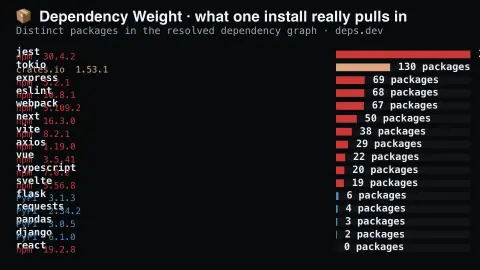
The Dependency Weight screensaver shows how many packages you actually install when you install one popular library. The pipeline resolves each full dependency graph through the key-less deps.dev API and counts what comes with it. It's free, runs in your browser, and ESC exits.
Live preview
Press ESC to leave fullscreen. Settings are saved in your browser only.
How the Dependency Weight screensaver works
The background pipeline reads this from deps.dev and saves a snapshot the saver loads.
How many packages you actually install when you install one popular library.
It refreshes on a schedule, so what you see stays current.
Colours can be changed in settings; nothing is stored beyond your own browser.
What a dependency graph count means
When you install a software library you rarely install just that library. It declares other packages it needs, and each of those declares more, forming a tree that is flattened into a graph when versions are resolved. deps.dev, the Open Source Insights project from Google, provides data about packages from ecosystems including npm, PyPI, Maven, Go, Cargo, NuGet and RubyGems, and its API returns a resolved dependency graph for a package version for npm, Cargo, Maven and PyPI.
That graph is returned as nodes and edges. Each node is a package version marked as the root itself, a direct dependency or an indirect one, and each edge links one node to another and records the requirement it resolves. The saver counts deps, the distinct packages in the graph, and edges, the links between them. An edges figure much larger than deps means many packages share common dependencies, which helps explain why removing one dependency does not always shrink the install.
These graphs are computed for a specific published version, not for your own project. Your lockfile can differ because of pinned versions, platform-specific packages and optional dependencies. The numbers describe how much code a package can bring in, a measure of supply-chain exposure and install weight, not of how much actually runs.
A worked example
How many packages you actually install when you install one popular library. The pipeline resolves each full dependency graph through the key-less deps.dev API and counts what comes with it.
Settings & tips
- Accent and Background recolour the display.
- Run
automation/run.py depsweightto refresh the feed. - Press ESC to leave fullscreen.
Frequently asked questions
- Is this real data?
- Yes — it comes from deps.dev and is refreshed on a schedule.
- Why do the numbers differ from my lockfile?
- This resolves the default published version's graph. Your own project may dedupe differently, pin versions, or skip optional dependencies.
- Is a key needed?
- No. This source is fully key-less.
- Is it free?
- Yes — free, no download, in your browser.
- What is the difference between a dependency and an edge?
- A dependency is a distinct package in the graph. An edge is a single requirement link from one package to another, so several edges can point at the same package.
- Are bigger graphs riskier?
- More packages mean more code and maintainers to trust, which widens exposure, but the count alone does not show whether any are vulnerable.
- Which ecosystems can have a dependency graph?
- deps.dev lists packages from seven ecosystems, but its dependency-graph endpoint currently covers npm, Cargo, Maven and PyPI.