Cursor-Reactive Particle Field Screensaver
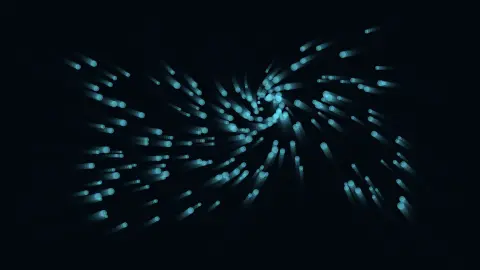
The Cursor-Reactive Particle Field screensaver shows a real particle field that genuinely responds to your live cursor position, even in fullscreen. It is free, runs in your browser, and ESC exits.
Live preview
Press ESC to leave fullscreen. Settings are saved in your browser only.
How the Cursor-Reactive Particle Field screensaver works
The saver tracks your real, live cursor position and steers a field of particles toward or around it.
Moving the pointer works in fullscreen too — only the ESC key exits, so you can genuinely play with the field without leaving.
If your cursor stays still for a while, the particles drift toward a slowly wandering point on their own, so it still looks alive when left unattended.
The whole scene runs as pure canvas math, with no external assets.
A particle field and the maths of attraction
A particle system is one of the oldest tricks in computer graphics. Instead of drawing a complex scene, it simulates many small points, each following simple rules, and the collective motion gives rise to smoke, sparks, swarms or, in this case, a field that reacts to a pointer. William T. Reeves of Lucasfilm’s computer graphics group described the technique in a 1983 SIGGRAPH paper, “Particle Systems—A Technique for Modeling a Class of Fuzzy Objects”, after using it for the wall of fire in the Genesis sequence of Star Trek II: The Wrath of Khan (1982). The paper presents it as a way to model fuzzy things such as fire, clouds and water.
In a pointer-driven field, every particle’s velocity each frame is the sum of a few influences. A force toward or away from the cursor typically weakens with distance, so only nearby particles feel a strong push. A little friction is applied so velocities decay instead of growing without bound, and a small random wobble keeps everything from collapsing into a point. Changing the strength of any one term changes the character from calm and liquid to sharp and jittery.
The effect works because of the number of particles, not the complexity of any one rule. Even though every particle ignores the others, you see emergent shapes such as ripples, rings and trails, since neighbours with similar positions receive similar forces. Updating a large number of particles per frame stays cheap because each update is only a few arithmetic operations.
A worked example
Sweep your cursor across the screen and a real trailing swirl of particles chases it, exactly tracking your pointer's real path.
Settings & tips
- Accent recolours the particles.
- Moving your mouse does not exit fullscreen — only ESC does.
- Particles wander on their own if the cursor stays idle.
Frequently asked questions
- Does moving my mouse exit fullscreen?
- No — only pressing ESC exits. Moving the cursor is exactly how this saver is meant to be used.
- Is a key needed?
- No — it is a pure local animation.
- Is it free?
- Yes — free, no download, in your browser.
- What happens if I walk away?
- The particles drift toward a slowly wandering point on their own, so it still looks alive.
- Why do particles not collide with each other?
- Checking every pair of particles scales badly with the count. Treating them as independent points keeps the cost proportional to their number, which is what allows so many per frame.
- What is friction doing in the simulation?
- It multiplies velocity by a factor slightly under one each frame, so motion fades gradually. Without it, particles would pick up speed from each push and eventually fly off screen.
- Where were particle systems first used?
- Reeves’s 1983 paper describes the technique as used for the wall of fire in the Genesis sequence of Star Trek II: The Wrath of Khan (1982), produced by the Lucasfilm computer graphics group.